


Equity in Athletics Disclosure Act (EADA) Report
Privacy of Student Records – Family Educational Rights and Privacy Act (FERPA)
Facilities and Services for Students with Disabilities
Office of Diversity and Inclusion
Textbook Information – Online Bookstore (TextbookX)
Educational Programs, Instructional Facilities, and Faculty
Transfer Students & Transfer of Credit
Accreditation, Approval, and Licensure of Institution and Programs
- The Southern Association of Colleges and Schools Commission on Colleges Reaffirms Accreditation for Presbyterian College
- School of Pharmacy
- Occupational Therapy Doctoral Program
- Physician Assistant Program
Copyright Infringement and Computer Use
Teacher Preparation Program Report
Notice of Availability of Institutional, Federal, State, and Local Financial Aid Information
Initial Loan Counseling for Student Borrowers
Exit Counseling for Student Borrowers
Institutional Code of Conduct for Education Loans
Withdrawal and Return of Federal Financial Aid
Intercollegiate Athletic Program Participation Rates and Financial Support Data (Equity in Athletics Disclosure Act)
SC Income Tax Credit for Tuition
Information on financial aid is available by visiting our PC Financial Aid Website at www.presby.edu. Click on the Financial Aid link in order to get more information. Specific questions can be asked on this website by sending them to [email protected]. Additional information available upon request from the Financial Aid staff and from the catalog and handbooks of the College consists of: descriptions of all financial aid programs available to students who enroll at Presbyterian College; procedures and forms for applying for such aid; rights and responsibilities of students receiving such aid; criteria for continued eligibility; criteria for determining good standing and maintaining satisfactory progress; means and frequency of payment of awards; terms of loans; general conditions and terms of student employment; and cost of attending the institution, including direct and interest costs.
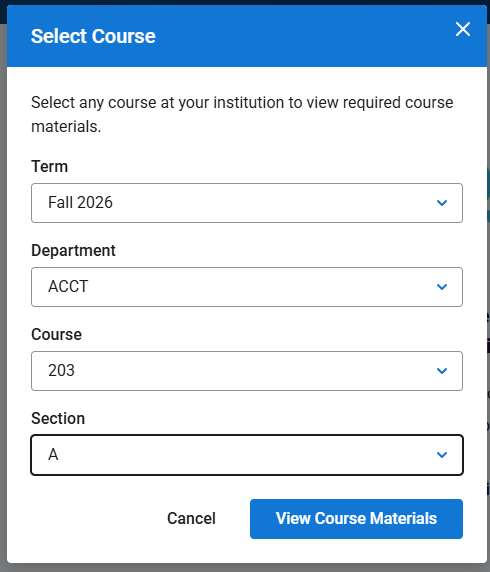
Textbooks and course materials are inline with the course listing per semester. Choose the course you are registered for.
Select Course Example Screen:
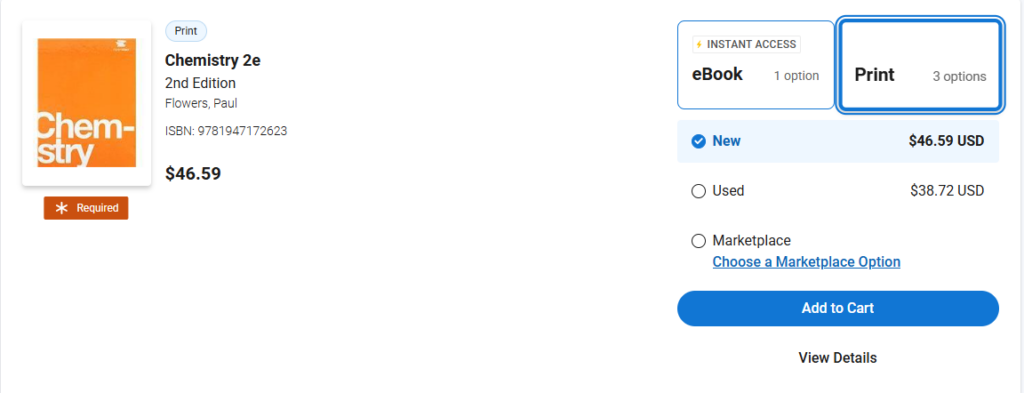
You will be given the following information:
Title, ISBN, Prices
Format; eBook, or print; new, used, rental
Textbook Selection Example Screen:
To receive a book voucher, you must have a credit balance on your account at some point. A credit balance—your account balance net of Authorized Aid—is shown in parentheses (for example, ($500)). These credits must come from your own funds, such as loans or overpayment, and not from PC. In some cases, the system may generate a temporary or “fake” voucher when it appears that a credit exists on your Student Account, even if the balance only shows as a credit momentarily.
For example, if you were not registered as a full-time student when the voucher was created, your charges would have been assessed at a part-time rate. This could make it look like you had a credit available for a short time. Once you were enrolled full-time and your charges updated to the full-time rate, that credit no longer exists. Another example, if you are on the payment plan and you receive a new scholarship. This could result in a temporary credit until your payment plan adjusts down to account for the new scholarship.
To receive a book voucher, you must have a genuine credit balance on your account, meaning the extra funds must come from your own payments, not from the school. At times, it may appear that you have a credit balance due to account discrepancies, such as when your enrollment status changes or a new scholarship is added but the account has not yet updated.
If you use a book voucher when you really don’t have one, you will have to pay that money back to the school.